How to Change Text Case: Uppercase, Lowercase, Title Case & More | TextToools
Choose a case format to change capitalization without retyping. Compare six common formats, preserve line breaks where expected, and review names or acronyms before replacing your text.
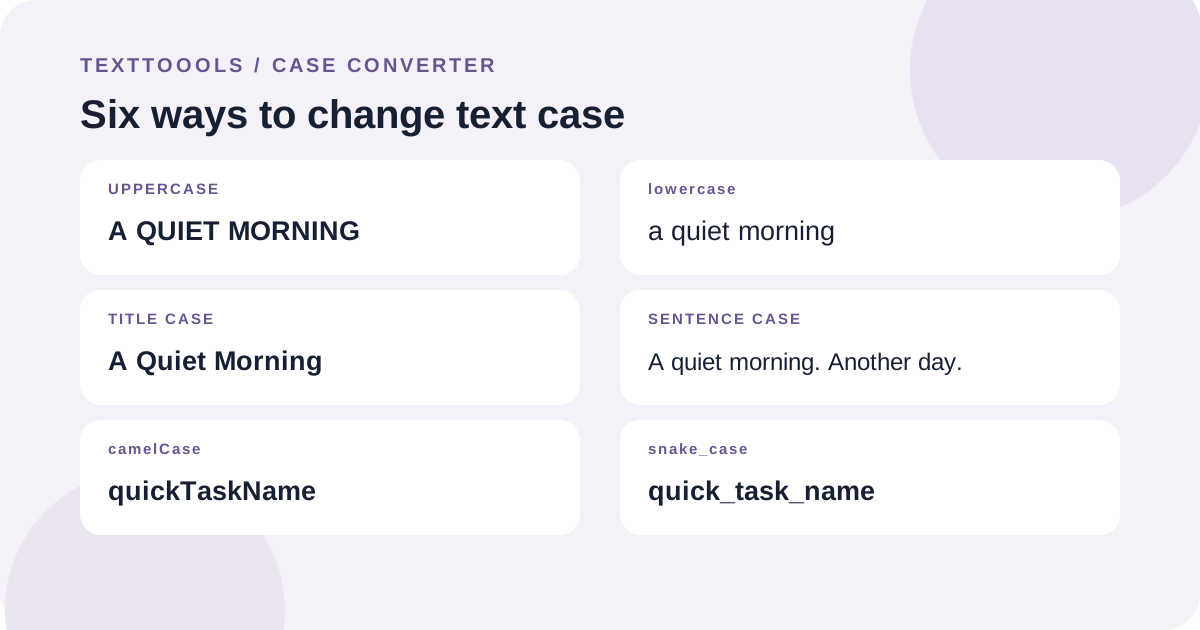
Choose the case format you need
A case converter changes capitalization so you do not have to retype a passage. The right format depends on where the text will be used: a heading, a sentence, or a code-style identifier.
For example, “a quiet morning” becomes “A QUIET MORNING” in uppercase, “a quiet morning” in lowercase, “A Quiet Morning” in Title Case, “A quiet morning” in Sentence case, “aQuietMorning” in camelCase, and “a_quiet_morning” in snake_case.
Uppercase and lowercase
Uppercase changes letters to capitals; lowercase changes them to small letters. These formats are useful for normalizing labels or correcting accidental capitalization in a passage.
They change letter casing throughout the text, including names and abbreviations. Check the result if a brand name, acronym, or other term must keep a specific form.
Title Case is not the same as an editorial headline style
In this converter, Title Case capitalizes the first letter of every word and lowercases the remaining letters. For example, “A Guide to Clear Writing” becomes “A Guide To Clear Writing.”
Different publishers use different headline rules, and some keep short words such as “to” lowercase. This format does not apply a publication’s style guide, so adjust articles, prepositions, names, and acronyms when needed.
Sentence case changes the whole passage
Sentence case lowercases the text, then capitalizes its first letter and the first letter after a period, exclamation mark, or question mark followed by whitespace. For example, “hELLO. wORLD!” becomes “Hello. World!”
It is a simple transformation, not a grammar checker. It may change proper names or acronyms, and it does not infer every sentence boundary after abbreviations or across a line break without sentence-ending punctuation.
Use camelCase or snake_case for identifiers
camelCase removes separators and capitalizes the start of each later word: “quick task name” becomes “quickTaskName.” snake_case joins the words with underscores: “quick_task_name.”
These formats split a line at punctuation and other characters that are not letters or numbers. Accented letters are retained. Each line is processed independently, so a multi-line list remains a list.
What happens to spaces and line breaks?
Uppercase, lowercase, Title Case, and Sentence case preserve the original spacing and line breaks while changing letters. camelCase and snake_case transform each line separately and keep the line breaks between them.
If spacing or indentation carries meaning in code, poetry, or formatted data, inspect the preview before copying. A case converter changes capitalization and identifier separators; it does not clean or validate the text.
Review before using the converted text
Preview the result and check names, acronyms, abbreviations, punctuation, and the required style. Keep a copy of the original until you are sure the transformed version is correct.
For a document or brand with a specific capitalization guide, use the converter for a first pass and then apply the required exceptions by hand.
A note from the founder
When I built the TextToools Case Converter, I kept Title Case and Sentence case as predictable transformations rather than trying to guess a publisher’s style guide or every sentence boundary. That makes the rules clear, but it is still worth checking names and acronyms before using the result.
About the author
Written by the founder of TextToools. I build privacy-respecting text tools because I believe your text should not have to leave your browser.